You can convert PNG to PDF for free using online tools like freepng2pdf, PNG2PDF, Canva, or JavaScript-based APIs, depending on whether you want a quick one-click conversion or full control over page size, margins, rotation, and PDF/A compliance.
This guide explains every method in depth so you understand exactly how PNG-to-PDF conversion works and how to do it without paying anything.
How to convert PNG to PDF
or click “Select Files”
How to use this converter
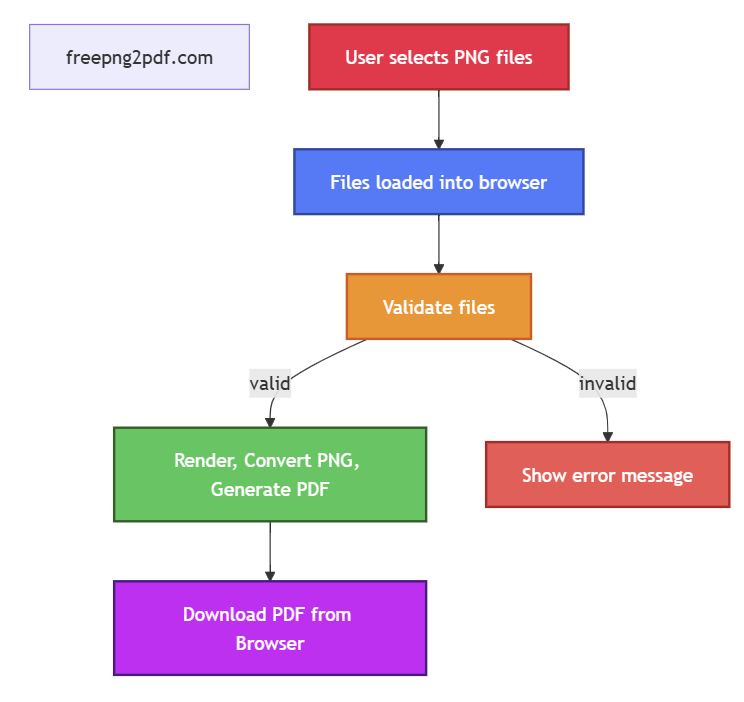
- Click Select Files or drag your PNG (also JPG and JPEG) or PDF files into the drop zone.
- Choose your mode: PNG -> PDF or PDF -> PNG.
- Click Convert to process your files locally.
- When the conversion is complete, click Save to download your results.
All processing happens directly in your browser nothing is uploaded.
Why choose an offline PNG to PDF converter?
Converting PNG images to PDF is one of the most common tasks in digital workflows, from sharing documents to archiving images or preparing files for printing. The good news: you can convert PNG to PDF for free, and you have multiple methods depending on your needs:
Most online converters require you to upload your files to a remote server, which can be slow, risky, and inconvenient. An offline converter like this one processes everything directly in your browser, giving you full control over your documents without relying on external services. There are also a lot of other helpfull tools in the internet like: Amateur Tech Geek .
- Instant online converters (no installation, no signup)
- Design tools like Canva (edit + convert in one place)
- Developer tools (JavaScript APIs for automation)
Below, you’ll find a complete breakdown of each method, how they work, and when to use them.
- Better privacy: Your files never leave your device, so sensitive documents stay secure.
- Faster performance: No upload or download delays — conversions happen instantly.
- Enhanced user experience: Now supports JPG and JPEG file conversions.
- Works without internet: Once loaded, the tool functions completely offline.
- No file size restrictions: You’re not limited by server upload caps or bandwidth.
- No ads, no tracking: A clean, distraction‑free experience focused entirely on your task.
If you value speed, privacy, and reliability, an offline PNG to PDF converter is the best possible choice.
Privacy advantages your files never leave your device
This converter is fully offline. Your images and documents are processed directly in your browser using secure, open‑source libraries. Nothing is uploaded, stored, or sent to any server.
- No tracking
- No analytics
- No cloud processing
- No hidden data collection
Your files stay on your device at all times, giving you maximum privacy and security.
How it works:
• Multiple PNGs (or JPGs or JPEGs) are merged into one PDF.• PDF pages are extracted as individual PNG images.
• All processing is done locally using browser‑based libraries like pdf-lib and pdf.js.
• Works offline once loaded.
What is a PNG?
PNG (Portable Network Graphics) is a high‑quality image format that supports lossless compression and transparency. It is ideal for screenshots, graphics, UI elements, and images where sharp detail matters.
What is a PDF?
PDF (Portable Document Format) is a universal file format designed to look the same on every device. It is ideal for printing, sharing multi‑page documents, and combining multiple images into one file.
PDF vs. PNG: When to use which format
-
Use PDF when:
- You want a multi‑page document
- You need consistent formatting across devices
- You want to combine several images into one file
- You need a format suitable for printing
-
Use PNG when:
- You need high‑quality images without compression loss
- You want transparency support
- You need separate image files
- You work with graphics, UI elements, or screenshots
Benefits of offline conversion
- Works without an internet connection
- Instant processing with no upload delays
- No server‑side file size limits
- Your files stay on your device
- Better performance because everything runs locally
Convert PNG to PDF for Free Using PNG2PDF.com
Best for: Quick, free, no‑signup conversions
Source:
png2pdf.com
PNG2PDF is a simple tool for converting PNG files to PDF. It supports single‑image conversions, batch processing, and multi‑page PDFs.
One PNG → One PDF
The site explains:
Select the PNG you want to convert. The tool will automatically create a PDF.
Steps:
- Visit png2pdf.com
- Upload your PNG
- Download the PDF
Multiple PNGs → Multiple PDFs (up to 20 images)
PNG2PDF allows uploading up to 20 PNGs at once, converting each into its own PDF.
Multiple PNGs → One multi‑page PDF
Upload up to 20 images to generate a single PDF with multiple pages. The page order matches the upload order.
This is ideal for:
- Photo collections
- Scanned documents
- Multi‑page reports
More than 20 images?
PNG2PDF suggests converting images in batches and then merging the resulting PDFs using combinepdf.com.
Important: Files auto‑delete after 1 hour
Converted files must be downloaded within one hour. After that, the system deletes them automatically.
Convert PNG to PDF for Free Using Canva
Best for: Editing and converting in one place
Source:
canva.com/features/png-to-pdf
Canva is a full design editor that also supports PNG‑to‑PDF conversion.
Canva explains:
You can convert and edit files in one place without needing separate software.
Turn your photos into PDFs in a single click.
How to convert PNG to PDF in Canva
- Go to canva.com
- Upload your PNG or create a new design
- Edit if needed (add text, graphics, resize, etc.)
- Click Download
- Select PDF as the file format
- Export your file
This is perfect if you want to:
- Add text or annotations to your PNG
- Combine multiple images into a layout
- Resize, crop, or stylize images before converting
Canva’s free plan supports PNG → PDF export without a watermark, making it a strong “png to pdf free” option.
Convert PNG to PDF Using JavaScript (Developer Method)
Best for: Automation, batch processing, enterprise workflows
Source: convertapi.com/png-to-pdf/javascript
If you’re a developer, you can convert PNG to PDF programmatically using the ConvertAPI JavaScript SDK. This is ideal for automated systems, web apps, and high‑volume conversions.
Basic JavaScript Example
The official example from ConvertAPI looks like this:
import ConvertApi from 'convertapi-js'
let convertApi = ConvertApi.auth('api_token')
let params = convertApi.createParams()
params.add('File', elFileInput.files[0]);
let result = await convertApi.convert('png', 'pdf', params)
Install the SDK
From the documentation:
npm i convertapi-js@~1.1
What You Can Control (Conversion Parameters)
According to the PNG to PDF JavaScript overview, you can:
- Control page size and orientation (e.g., A4, Letter, A0–A10)
- Set horizontal and vertical margins in millimeters
- Rotate content to match layout expectations
- Set color handling and apply an ICC color profile
- Enable PDF/A‑1b compliance for long‑term preservation
Some key parameters from the documentation:
- File: PNG file to be converted (URL or file content)
- Rotate (Integer): -360 to 360 degrees
- ColorSpace: default, rgb, srgb, cmyk, gray
- ColorProfile: default, isocoatedv2
- MarginHorizontal / MarginVertical: 0–500 mm
- PageSize: default, a0–a10, letter, legal
- PageOrientation: default, portrait, landscape
- Pdfa (Bool): create PDF/A‑1b compliant document
- StoreFile (Bool): in‑memory vs. temporary encrypted storage
ConvertAPI also notes that when StoreFile is set to True, the converted file is stored in encrypted temporary storage and available via a time‑limited secure URL (up to 3 hours). When set to False, conversion happens entirely in memory and the raw bytes are streamed back, which maximizes security.
This method is perfect when you want to integrate “how to convert png to pdf” directly into your application logic, while still keeping the option of “png to pdf free” via free tiers or trial quotas.
When to Use Which Method (Quick Comparison)
| Method | Best For | Free? | Notes |
|---|---|---|---|
| freepng2pdf.com | Quick, easy and free conversions | Yes | Up to 20 images; files get converted on your computer |
| PNG2PDF.com | Fast, simple conversions | Yes | Up to 20 images; files auto‑delete after 1 hour |
| Canva | Editing + converting | Yes | One‑click export; great for design and layout |
| ConvertAPI (JavaScript) | Automation & developer workflows | Yes (with free conversions) | Full control over page size, margins, color, PDF/A |
Is it really free to convert PNG to PDF?
Yes. Tools like freepng2pdf, PNG2PDF and Canva offer free PNG → PDF conversion. Developer tools like ConvertAPI also provide free quotas.
Can I combine multiple PNGs into one PDF?
Yes. PNG2PDF lets you upload up to 20 images and combines them into a single multi‑page PDF in the order uploaded. For more than 20 images, you can create multiple PDFs and merge them using combinepdf.com.
Can I convert PNG to PDF offline?
The tools discussed here are online. However, many desktop PDF editors and image tools (like some PDF printers or image editors) can also convert PNG to PDF offline. If you’d like, you can extend this workflow with offline tools as well.
Can I automate PNG → PDF conversion?
Yes. Using the ConvertAPI JavaScript SDK, you can integrate PNG‑to‑PDF conversion into your own applications, scripts, or backend services, with full control over layout and compliance settings.
Conclusion: The Best Free Ways to Convert PNG to PDF
You now have multiple ways to handle “how to convert png to pdf” and “png to pdf free”:
- freepng2pdf free, quick and safe
- PNG2PDF for quick, no‑frills conversions and multi‑page PDFs
- Canva when you want to edit, design, and then export as PDF
- ConvertAPI (JavaScript) when you need automation, control, and integration into your own systems
Whether you need a simple one‑click solution or a developer‑grade workflow, you can now confidently convert PNGs to PDFs for free — and understand exactly what’s happening at each step.